
Skol Casino Login: Safe Sign-In and Account Access
 Available in GB
Content
Safe account access
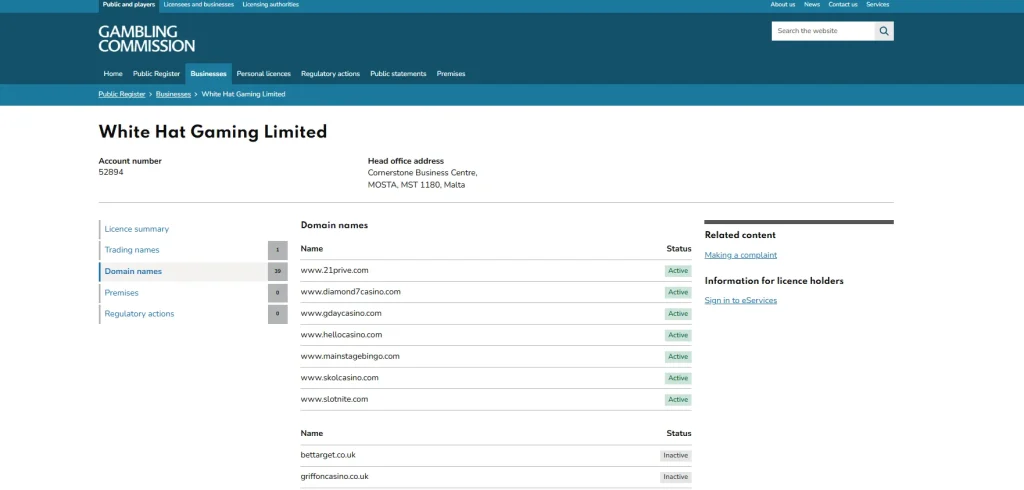
The safest starting point for a Skol Casino login is the official domain, skolcasino.com. The Gambling Commission public register currently lists www.skolcasino.com as an active domain under White Hat Gaming Limited, account 52894. That register check is useful because it gives Great Britain players an independent way to recognise the correct site before entering account credentials.
Skol also supports browser-based mobile use, so a phone or tablet does not require an unofficial app or mirror link just to sign in. If access fails, use the normal recovery options shown on the official site, then move to verified support if the problem continues. Skol’s established support routes are 24/7 live chat and email at [email protected]. Do not use guessed password-reset URLs, copied login pages or third-party links that ask for credentials.
account guide
Verification guide
Licence and trust
Domain check
Use the Gambling Commission record as a phishing filter
A login page is one of the highest-risk places to follow an unfamiliar link because it asks for credentials that can unlock a real-money account. For Skol, there is a simple external reference point: the Gambling Commission register lists www.skolcasino.com as active under White Hat Gaming Limited. If a message, advert, search result or social post sends you to a different lookalike address, stop before entering an email address or password.
This does not mean every page that contains the word Skol is malicious. It means the regulated domain record is the strongest practical anchor available to a Great Britain user. The broader licence and trust explains the White Hat Gaming relationship and why the Great Britain licence record matters.
Troubleshooting
A practical sequence when your Skol login does not work
| Step | What to do | Why it helps |
|---|---|---|
| 1. Confirm the domain | Start from skolcasino.com rather than a saved third-party link. | It reduces the chance of typing credentials into a lookalike page. |
| 2. Re-enter account details carefully | Check for typing errors, unwanted spaces and device autofill using old details. | Many access failures are simple credential mismatches rather than account problems. |
| 3. Use the site’s current recovery flow | Follow the password or access-recovery option presented on the official site. | Recovery URLs and screens can change, so the live route is safer than a copied link. |
| 4. Check whether verification is involved | Read any account message asking you to complete an identity step. | Access and identity checks are different problems and need different responses. |
| 5. Contact support | Use live chat or [email protected] if the issue remains unresolved. | Support can identify account-specific causes that a generic guide cannot see. |
Mobile sign-in
Browser access is the normal route on a phone
Skol supports browser-based mobile play. That means a mobile user can reach the same account environment through a browser without relying on a separate download simply to log in. For safe access, type or bookmark the verified domain and use the login route shown there.
This matters because app-store and web search results can contain products with similar names that are not the regulated casino account service. The safest habit is to treat the verified domain as the starting point and then follow only the account links presented by that site.
If you want the wider device picture, including why browser access is preferable to unverified downloads, use the main site navigation from the Skol Casino review. The login page itself stays focused on account access.
Verification and restrictions
A login problem can be different from a verification problem
If the site accepts your credentials but then asks you to complete an identity step, treat that as an account-status issue rather than a password issue. Remote gambling operators in Great Britain have customer identity obligations, and some account actions can depend on verification being complete.
The verification explains the regulatory framework without inventing a fixed document checklist or processing time. If your problem is simply forgotten credentials, use the current recovery flow. If the account is restricted or verification is requested, read the live message and use support if the next step is unclear.
A safer login routine for desktop and mobile
Start every sign-in by checking the destination. The verified official domain is skolcasino.com, and the Gambling Commission domain record links Skol to White Hat Gaming Limited. That gives you an independent reference point when a search result, saved bookmark or message sends you somewhere that only looks familiar. Do not use an unofficial mirror, a guessed recovery address or a third-party page that asks for credentials away from the verified domain.
On mobile, the normal route is still the browser. Open the official domain directly, navigate to the account sign-in and use the site’s own recovery option if the account details are not accepted. This page does not publish a guessed password-reset URL because recovery paths can change. Following the account’s own route is safer than searching for a separate reset page and reduces the chance of landing on a lookalike address.
If sign-in still fails, separate access trouble from verification trouble. An incorrect password, an account-recovery step and an identity check are different issues, even if they interrupt the same session. Skol account verification is required, so an official request for account checks should be handled through the site rather than bypassed by opening another account. The account guide explains the broader account journey, while the verification page covers the limits of what can be stated about KYC without inventing a document list or completion time.
Support is the final verified route when the normal sign-in and recovery steps do not resolve the problem. Skol support is available through 24/7 live chat and the verified support email, [email protected]. Keep the request focused on the account problem and do not send sensitive information through an unrelated website or contact channel. There is no need to search for a phone number or unofficial support profile when the established chat and email routes are already available.
A useful habit is to keep the official domain as the starting point even after the access issue is fixed. Bookmarks can help, but the domain itself remains the key check. If a link arrives in an email or message, compare the destination with skolcasino.com before signing in. That simple domain check, combined with the regulator record and the site’s own support channels, gives the login page practical value without relying on unofficial mirrors, bypass methods or invented recovery instructions.
When using a shared or unfamiliar device, avoid turning convenience into an access problem. Reach the official domain yourself, do not save credentials in a page you do not control, and sign out when the session is finished. These are ordinary account-safety steps rather than Skol-specific product claims, but they support the page’s main purpose: getting back into the correct account without creating a second account, using a mirror or handing credentials to an unrelated service.
If the account opens normally on one device but not another, keep the troubleshooting narrow. Confirm that both devices are using the same official domain, then use the site’s normal account route and support channels rather than trying alternative casino addresses. A device difference does not prove that the account itself is blocked, and an account check does not justify bypassing verification. The safest sequence remains domain check, normal sign-in, official recovery and verified support.
If support is needed, describe the access problem without publishing passwords or recovery details elsewhere. The verified chat and email routes are the right places to ask what the account needs next.
Keep that sequence consistent each time you sign in, especially when a search result or message provides the starting link.
The safest route back into your Skol account
Start at skolcasino.com, confirm that the address is correct and use the login or recovery tools shown on that site. On mobile, the browser route is enough, so there is no need to hunt for unofficial downloads or mirror pages. If access still fails, use 24/7 live chat or [email protected] and keep credentials private. When the issue is identity status rather than the password itself, move to the account verification process instead of repeatedly trying to sign in.
This material was created by the Skol Casino UK Guide team.
Related posts

UK Casino Rules at Skol: Slot Limits, Bonuses and Safer Gambling
Skol Casino Sister Sites: Current White Hat Gaming Alternatives